Melody.
The player is the easy part. Keeping the queue, the mini player and background playback in agreement is where a music app starts to become interesting.
A little more in tune.
Local music should be easy to find and play without rebuilding a playlist every time the app opens. Melody brings device scanning, favorites and playback into one Flutter application.
A few decisions.
One queue, two views
Provider connects the mini player and full player to shared playback state. A change in one view should be reflected in the other.
Playback beyond the screen
just_audio and Android background audio support keep the listening session separate from the visible player interface.
Keep the small things local
Favorites are persisted with shared_preferences. Lyrics use an LRCLIB lookup and a cache, so repeated reads do not need the same request.
Read the demo walkthrough
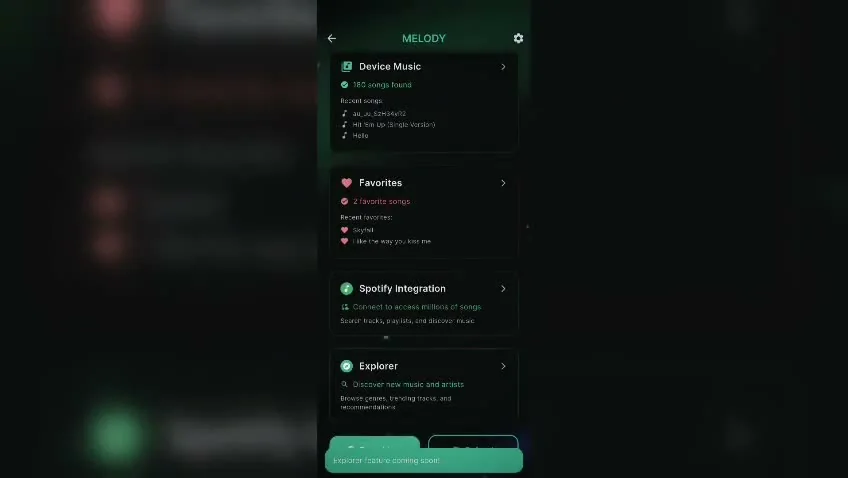
- The recording opens with a splash screen and a sign-in form, then moves to a dark green home screen with Device Music, Favorites and integration cards. Some integration cards are placeholders.
- The local library displays a searchable list of songs with artwork and play buttons. Selecting a song opens a full player with cover art, track information, a progress slider and playback controls.
- The player changes between several songs. A lyrics panel displays lines beneath the playback position. The recording has no audio track, so it demonstrates the interface rather than sound output.
- Returning to the home screen leaves a compact player along the bottom. The settings screen then shows playback, lyrics, theme, cache and account options. Their presence in the recording does not verify every option is implemented.
Work, with context.
The repository documents local library scanning, queue reordering, shuffle and repeat, favorites, lyrics and background playback. The recording below shows an earlier version of the interface; some integrations visible in it are placeholders.
Implementation and feature documentationThere’s more to figure out.
The next engineering question is resilience: permission changes, missing files and interruptions during playback. Those deserve device testing before calling this production-ready.